Guest Viewers
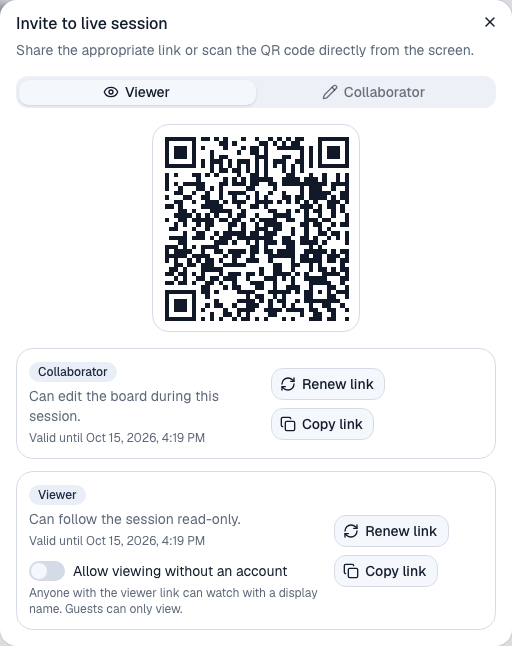
Allow anyone to view your live board without signing in. Guests see the board in read-only mode and are identified in the participant list by their chosen display name.
Guest access lifecycle
- Enable
Turn on Allow viewing without an account in the invitation dialog.
- Join
Open the existing viewer link and choose a display name.
- Watch
Follow live canvas updates and the participant list without editing.
- Revoke
Disable access, renew the viewer link, remove a participant, or end the session.
Enabling Guest Access
On the Collaboration page, choose Invite for the session, then toggle Allow viewing without an account in the Viewer section. This enables guest access for the existing viewer link. Renew the viewer link separately when needed. Disabled by default.
Joining as a Guest
Open the viewer link and enter a display name (1–40 characters). You can now watch the board live, follow collaborator updates, and see the participant list. Collaborator links require a valid invitation and a local account or existing GitHub sign-in.
Guest Lifecycle
Guest access ends when:
- The owner toggles Allow viewing without an account off
- The owner renews the viewer link
- The owner removes you from participants
- The session ends or expires
Turning guest access off disconnects current guests immediately. Previously issued collaboration tickets remain revoked after access is re-enabled or the collaboration server restarts. A fresh authorized ticket is required to join again. If live revocation cannot be completed, the settings request reports an error and should be retried.
Guest names are not verified and not persisted after the session ends.
Operator note
Guest viewers work for both repository sessions and ad-hoc rooms. The feature requires application database migration V14 and collaboration database migration V2. Upgrade the web app and collaboration server together.